Research method · August 2026

AI-powered dog bark detector

Barktown is a field instrument for documenting dog barks over time. This page explains how the bark sounds are detected, captured and presented.

Designed and built by Angie Hjort, Encharted Media AB

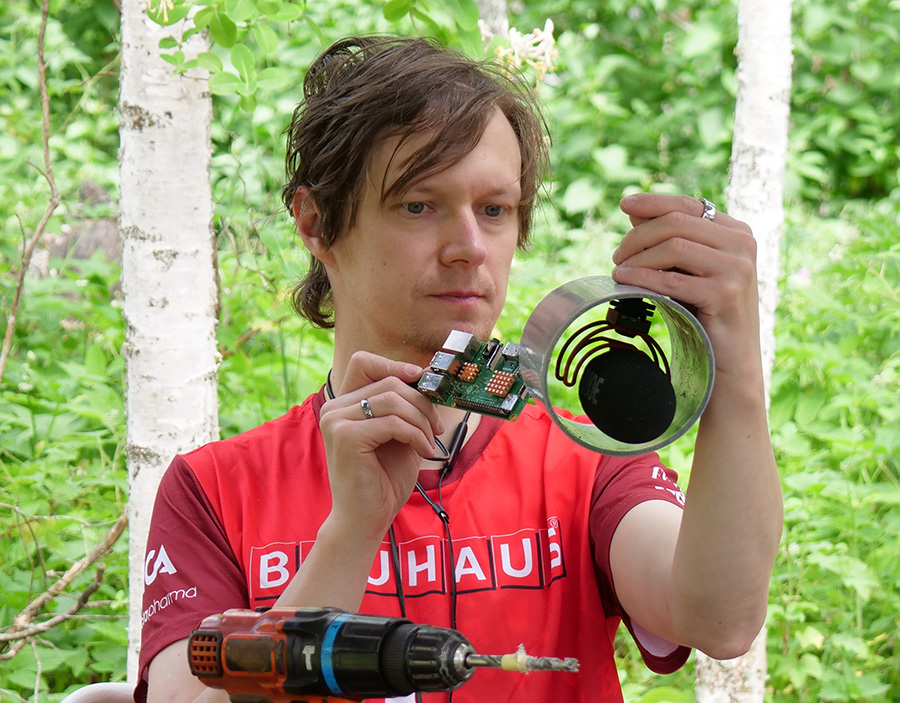
Angie adjusting the Barktown field instrument outdoors
Barks detected
Loading…
Time barking
Loading…
Disturbance events
Loading…
Counting since
1 August 2026
01

What Barktown is and isn't

Barktown listens for repeated dog-like sounds at one fixed location and turns them into a dated, reviewable diary. It does not identify a dog or decide where a sound came from.

Learn more

The aim is consistent observation: preserve the time, surrounding audio and loudness measurements for sound events that are likely barks. The detector is trained to ignore people, birds, traffic and other noises, but it is not 100% accurate. A human would review and delete any mistakes.

Technical details

The measured target is a binary acoustic classification — wanted dog sounds (bark or yap) versus other local sounds — followed by a deterministic event-assembly step. The classifier emits a probability-like score; that score is evidence about acoustic similarity, not a calibrated probability that a particular dog barked.

Each retained event has an audio clip and timestamps, so the automated result remains falsifiable by listening. The system performs no speaker identification, animal identification, direction finding or source localisation. A Barktown record is therefore a candidate acoustic event, not an attribution or legal conclusion.
What Barktown is and isn't
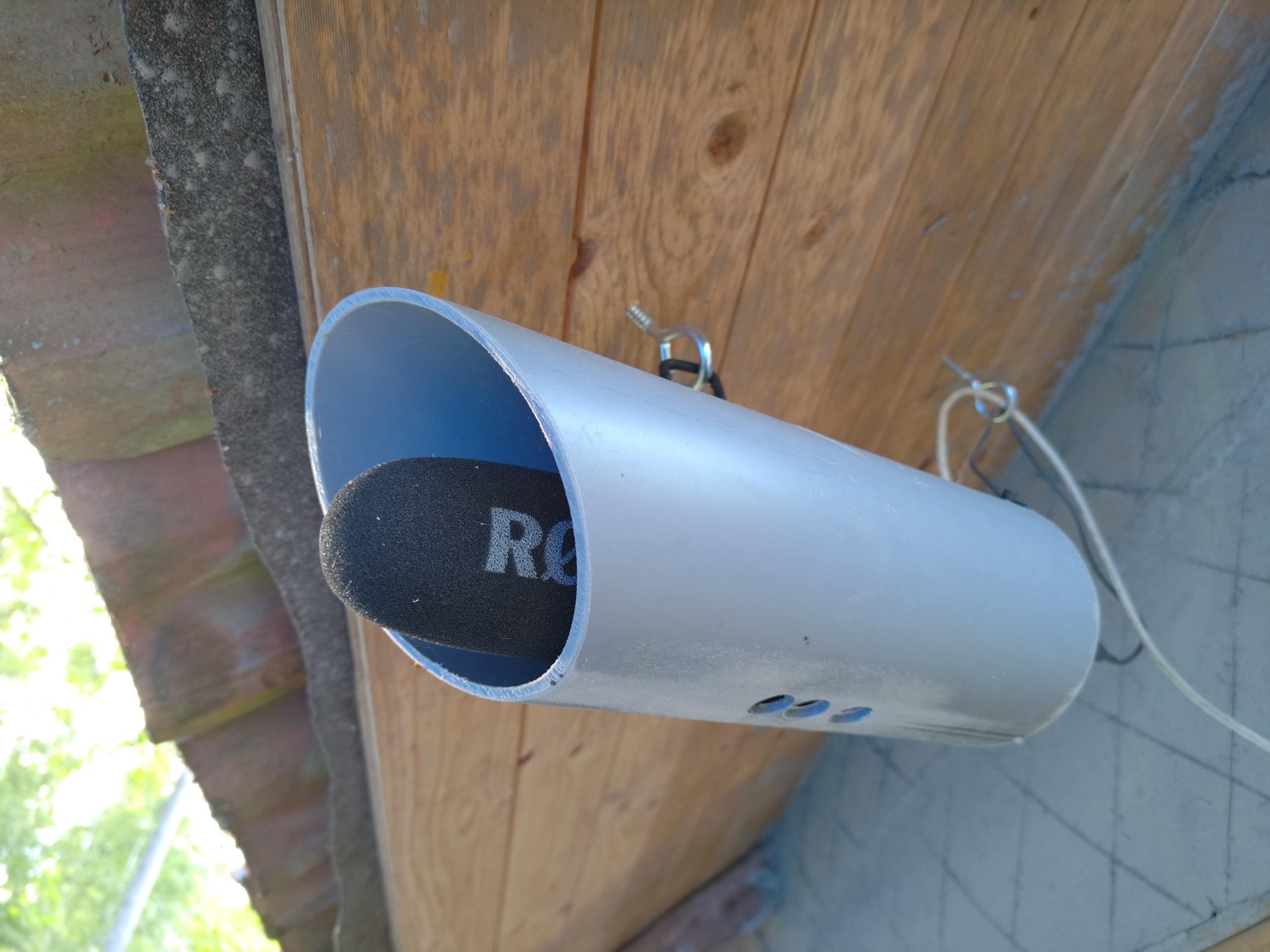
Directional microphone
02

6 years of barking disturbance

This project started out of a frustration of not being able to rest at home. The problem did not appear yesterday. See the history below:

Learn more

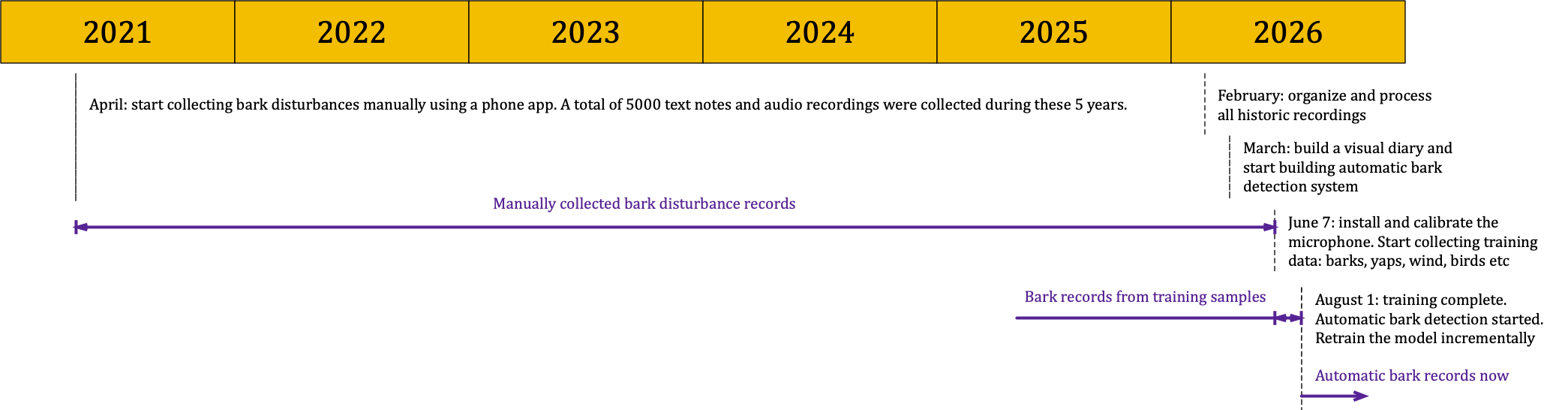
The dog disturbances were collected manually since 2021 and piled up on hard drives. Only in February 2026 have we made the Barktown visual diary to browse and listen the collected recordings. Later same year we acquired hardware and built the automatic AI detector.

Technical details

4120 manual disturbance text notes

1295 manual disturbance audio recordings of disturbances

6 years of barking disturbance
Project timeline
03

Collecting examples of barks

The AI bark detector had to learn from local examples of sounds, so we made a system to record and label those. Apart of actual barks and yaps we have also collected examples of everything that is not a bark: traffic, wind, wildlife, homestead, etc

Learn more

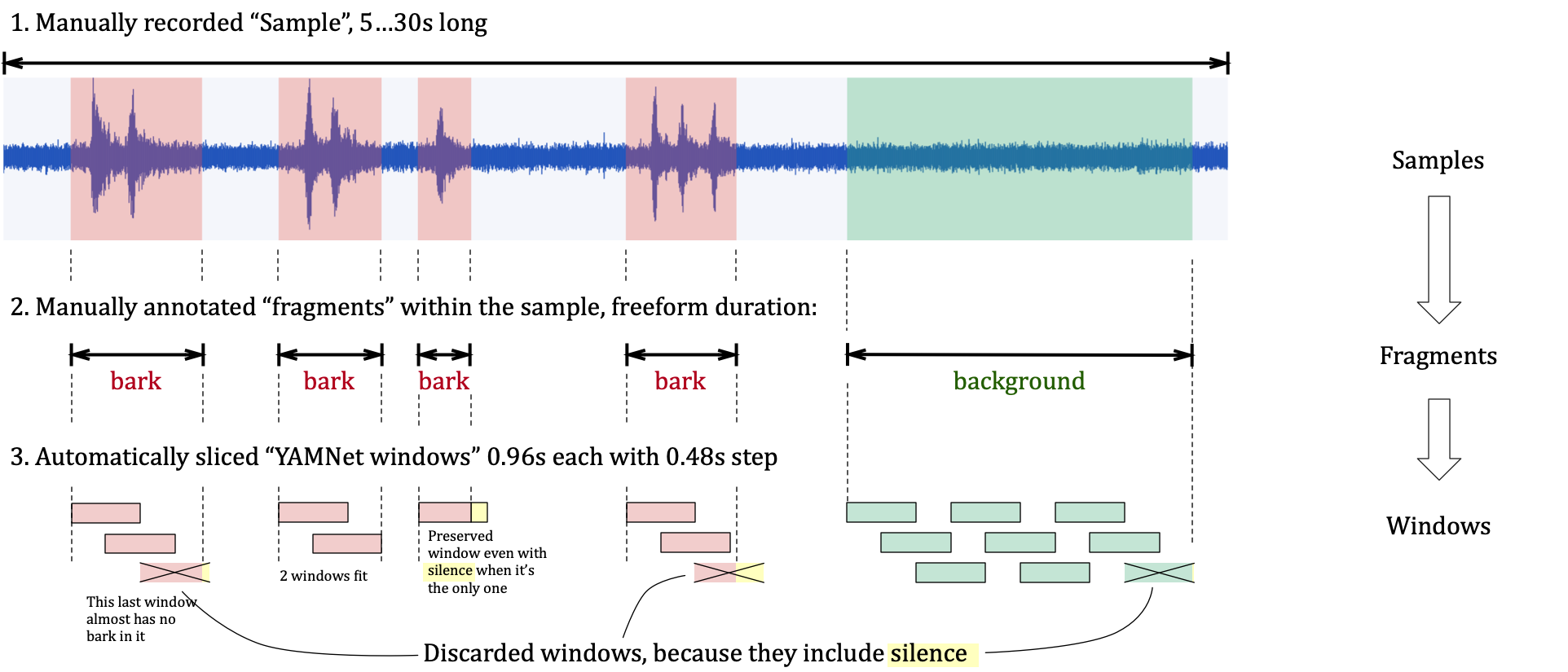
In each sample recordig we have manually labeled fragments that sound representative. These fragments are later sliced into yet finer portions called "windows" by the learning model called YAMNet, see the next section

Technical details

We have manually collected 679 sound samples using the exact hardware setup and location that would be later used for detection. Collecting samples took about a month and labeling fragments took about a week of work.

Manually labeled fragments are sliced into Windows that have a fixed length of 0.96s, as required by the sound classification neural network YAMNet. We discard windows that may have not enough information, such as the incomplete ones in the end of fragments — those may just include silence after barks

Collecting examples of barks
Example of samples, fragmets and windows
04

How the AI was trained

YAMNet is a pre-trained deep learning model by Google that identifies 521 different audio event classes — like animal sounds, speech, or sirens — from an audio waveform. The Barktown learning happens on top of YAMNet's existing learning. This is called transfer learning. It lets us train a useful local detector with far fewer examples than would be required to build an audio model from scratch. An analogy would be hiring someone who already understands sound generally, then training them on the specific distinction that matters at this location.

Learn more

Barktown uses YAMNet model as a sound-feature extractor: each short audio fragment is converted into a 1024-number “sound fingerprint” describing patterns YAMNet has already learned, such as rhythm, pitch and texture. Our labelled samples then train a much smaller Barktown classifier to interpret those fingerprints and learn the local distinction between bark/yap and everything else, with confusing negative examples deliberately included

Technical details

Audio is mixed to mono, resampled to 16 kHz and passed through YAMNet. Its overlapping analysis windows are approximately 0.96 seconds long with a 0.48-second step, each producing a 1024-dimensional embedding. The custom part is that Barktown then trains a small classifier that combines 128 learned sound patterns and produces a single score for how bark-like the audio is. During training, some signals are randomly hidden to reduce memorisation. Training stops when performance on held-back audio no longer improves. The final cutoff balances detected barks against false alarms, favouring fewer false alarms when undecided.

How the AI was trained
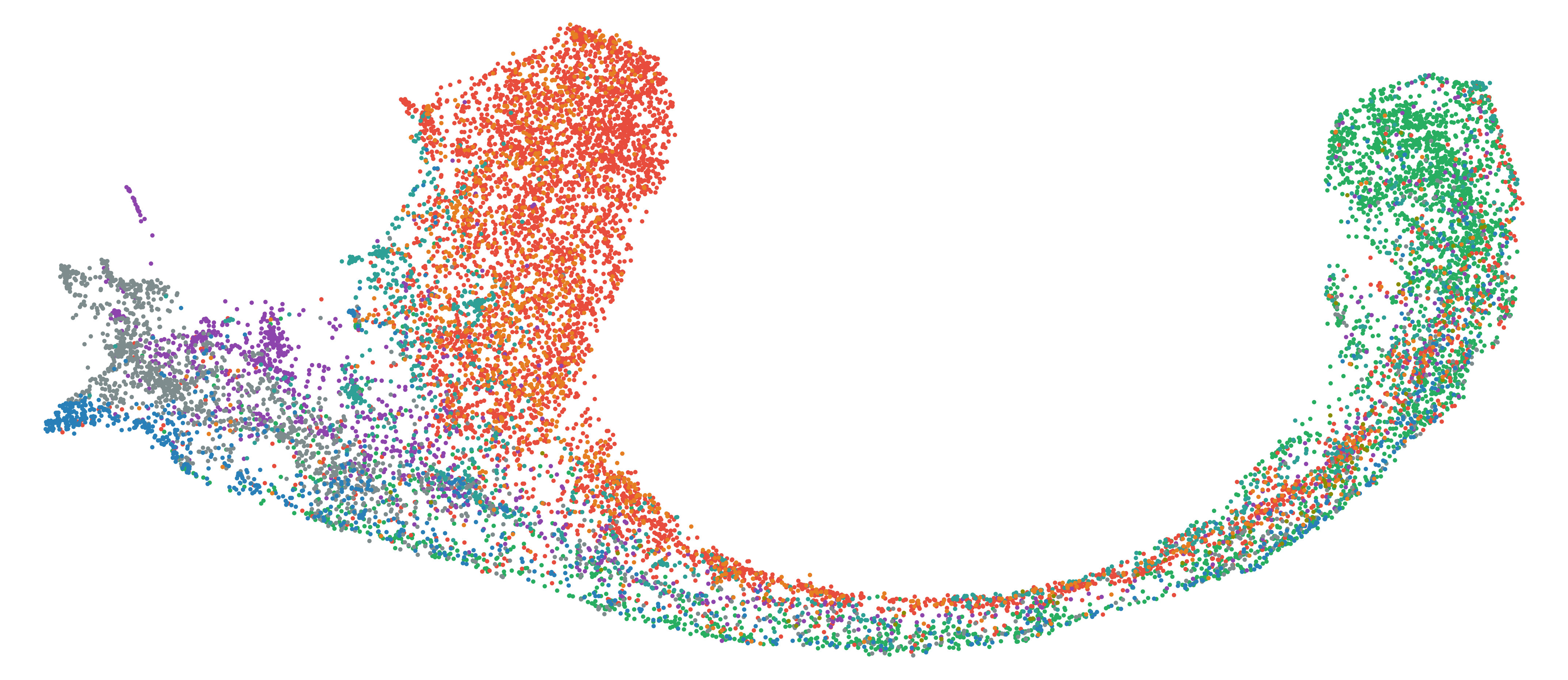
Training quality diagram
05

From sound to a diary record

Barktown repeatedly checks recent sound, waits for several matching observations, then preserves a recording of the whole session. The result is uploaded, organised and placed in the diary for a human review.

Learn more

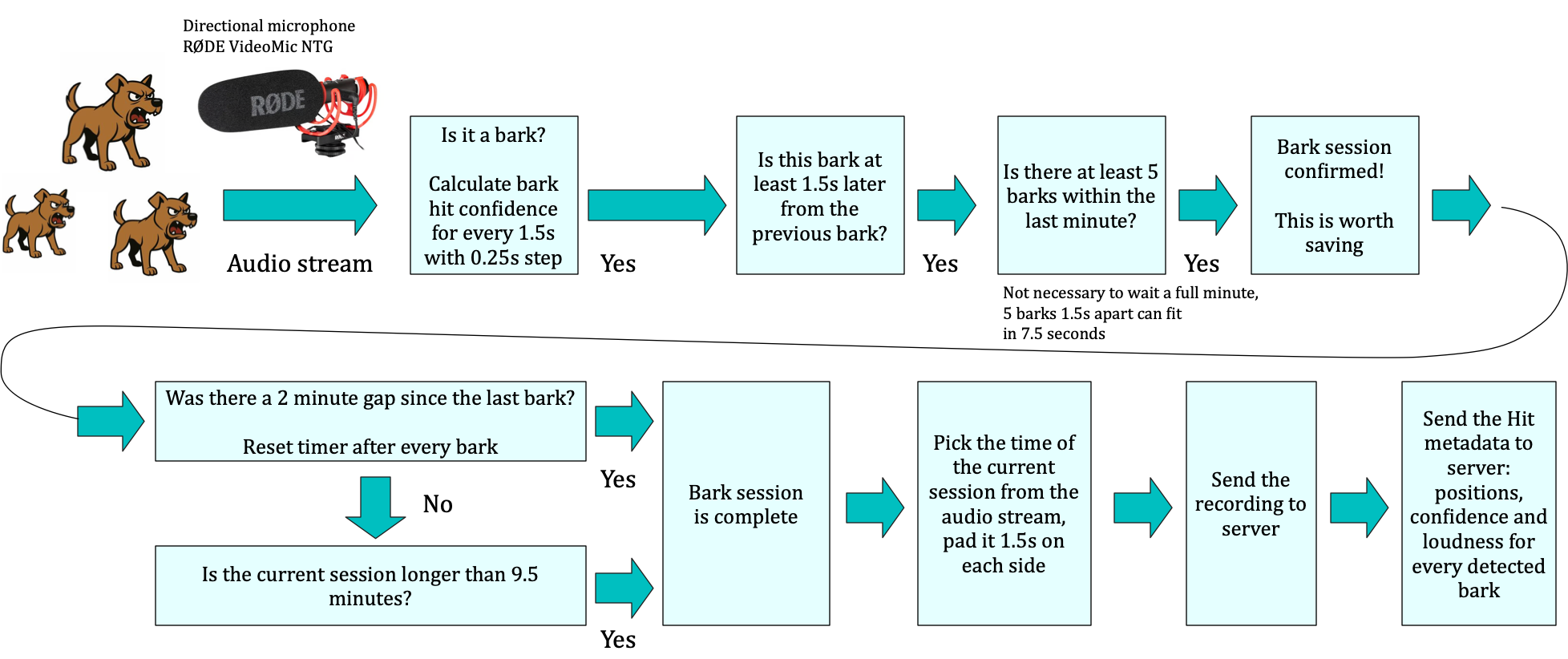
Recent sound is held temporarily in memory. A clip is retained only after several bark-like observations support one event, with a small amount of sound before and after it for context. A single high score is not enough. The detector asks for repeated evidence within a time window, prevents one bark from being counted several times and joins nearby barks into one session. When the session is over, it saves the surrounding audio and sends both the recording and its measurements to the archive.

Technical details

The current instrument is a RØDE VideoMic NTG connected to a Raspberry Pi. The live stream is captured at 48 kHz and resampled to 16 kHz for YAMNet. A trailing 1.5-second buffer is scored every 0.25 seconds. Current bootstrap defaults require a score of at least 0.92, four accepted hits within a 30-second sliding window and at least 1.5 seconds between counted hits. That minimum separation — called hit refractory in the code — stops overlapping analysis windows from double-counting barks.

A deterministic state machine moves through IDLE → ACTIVE_CANDIDATE → ACTIVE_CONFIRMED → COOLDOWN. A 120-second sub-threshold gap closes the current session in the boot configuration; renewed barking during cooldown reopens it. Audio is encoded in memory, uploaded to MinIO, validated by the ingest service, indexed in SQLite and exposed to the UI with waveform and per-hit metadata.

The live device uses an in-memory ring buffer, avoiding continuous day-long audio storage and unnecessary writes to the Pi’s SD card. In the current bootstrap configuration the buffer holds 700 seconds, confirmed events can extend to 570 seconds, and 1.5 seconds of padding is added at each end before upload. Detector parameters are stored in the API/database and can be updated during runtime.

From sound to a diary record
Detection pipeline
06

It got complicated

Listening, storage and presentation are separate parts of the system. The detector can keep working if the web page is closed, while recordings remain available for later review.

Learn more

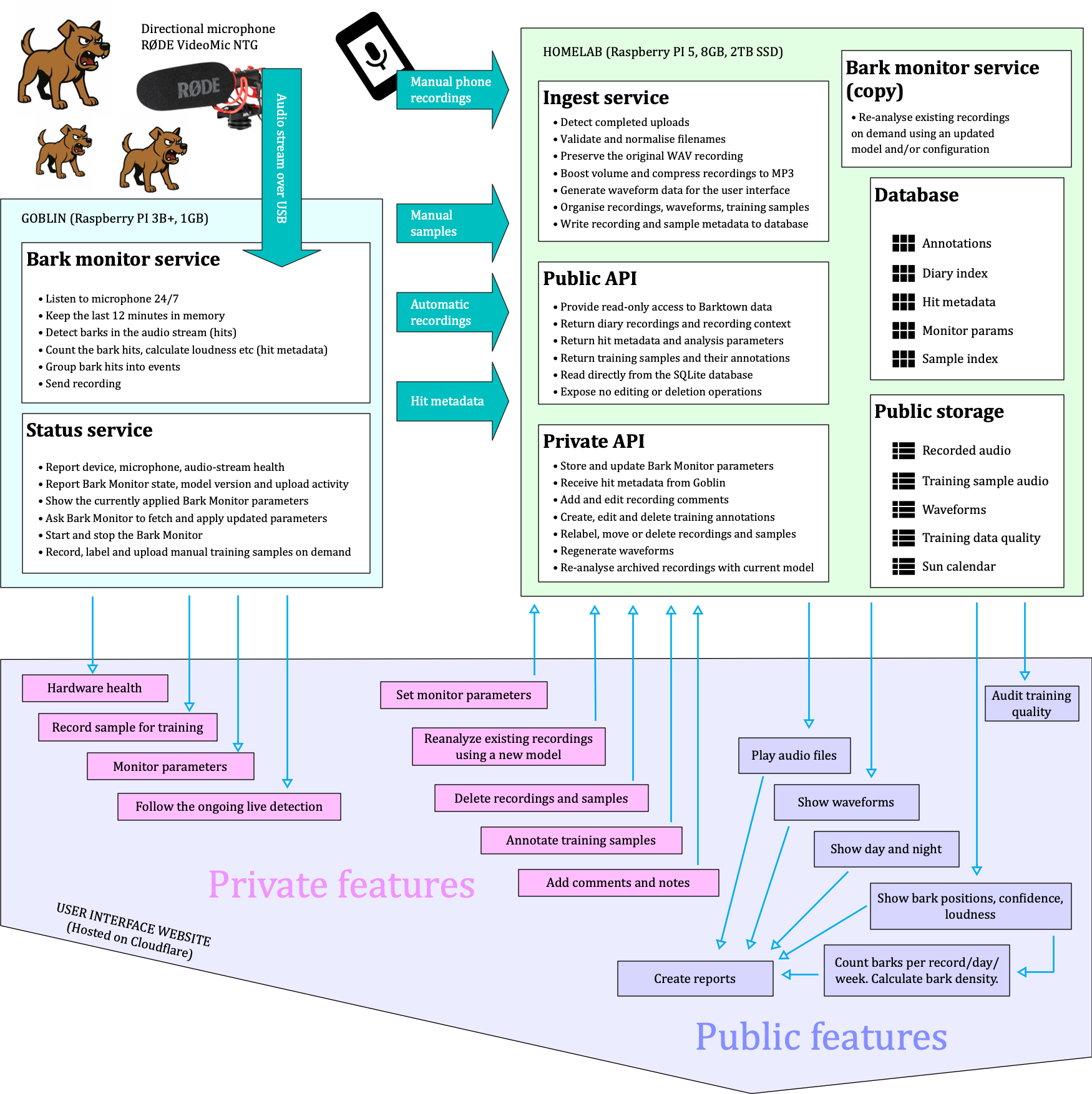
The field device runs the microphone and detector. A second service validates uploads, stores audio and metadata, and provides the application interface. The Barktown website reads that interface to show the diary, reports and training workspace; laptop tools handle calibration, data inspection and model training.

Technical details

The runtime is split across four version-controlled repositories: the SvelteKit UI, the Python Raspberry Pi monitor, the Node/SQLite ingest API and the Python training/calibration utilities. Audio objects live in S3-compatible MinIO storage; diary, annotation, detector-parameter and provenance records live in SQLite. The API is the persistent source of truth for live tuning, while checked configuration supplies validated first-boot fallbacks.

Model artifacts are deployed as a TFLite classifier plus adjacent metadata; the runtime verifies the declared filename and SHA-256 before loading a new bundle. The same scoring and hit-gating core is reused for live inference and offline re-analysis, reducing the risk that the review path silently applies different rules.

Operational status includes microphone presence, stream state, sample rate, recent RMS and peak levels, clipping, x-runs, CPU temperature, storage, network reachability and upload counters. The monitor and its status service run separately, so observation of the instrument does not share the detector’s main process.

It got complicated
System Architecture
07

Visual presentations

The diary shows when a suspected event happened, and the report shows patterns across two weeks. Every result leads back to playable audio so a reviewer can check the system rather than trust a number on its own.

Learn more

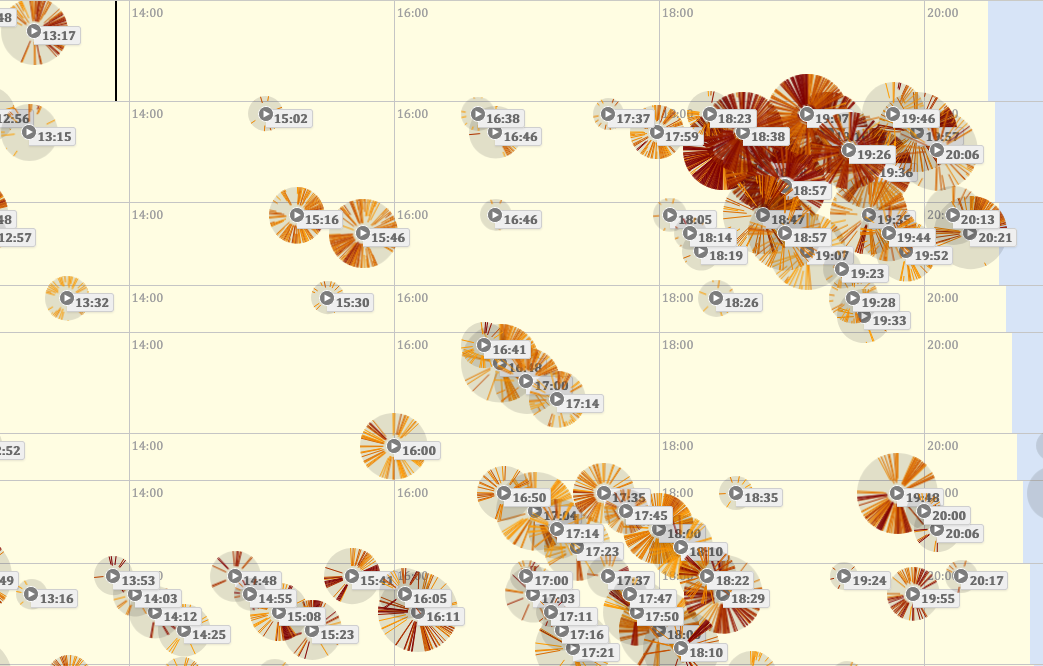
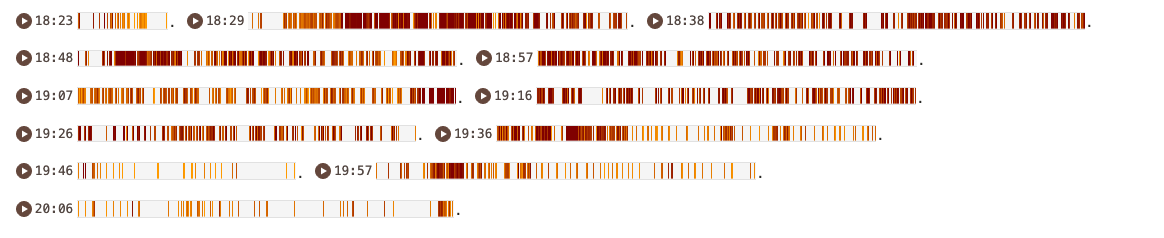
Recordings appear on a time-of-day timeline with waveforms, labels and notes. Weekly summaries count events and describe their distribution, while confidence and relative loudness help find recordings worth closer inspection. Reviewers can correct false positives and re-run archived material with the current model.

Technical details

Each accepted hit can carry a timestamp, classifier confidence and loudness relative to below-threshold windows in the same clip. Event-level records include duration, peak and mean score, hit count, hit density and maximum/mean loudness ratios. These are descriptive diagnostics; they are not sound-level-meter readings and should not be interpreted as calibrated decibels at a property boundary.

Offline re-analysis records model and settings provenance alongside its results, allowing a reviewer to distinguish the original detector output from a later model’s interpretation. The UI preserves the audio as the primary evidence and presents derived metrics as aids to navigation and quality control.

Visual presentations
Suggested: one diary event beside its corresponding two-week summary.
08

No free lunch

The system hsa imperfections

Learn more

Technical details

This is event-triggered sampling. It is efficient and privacy-conscious, but it has an important evidentiary limit: saved clips can confirm what the detector captured, while the absence of a clip does not by itself prove the absence of barking. Training fragments retain their parent recording and time bounds so their provenance can be traced.

No free lunch
Suggested: one diary event beside its corresponding two-week summary.

The honest boundary

What the record can support

It can show

What is audible in a retained clip, when that clip was captured, how the detector responded and whether similar retained events recur.

It cannot show by itself

Which dog made a sound, where it was located, every bark that occurred, or whether the evidence meets a legal definition of nuisance.